 Welcome, Join Guud Forum Login! Stats: 2,847 Members 4,418 topics Date: Tuesday 03 March 2026 at 07:21 AM |
| General: News-Politics-Others, Jobs-Business-Investments, Health, Religion, Romance, How To |
| Science & Technology: Science and Tech, Phones and Tech Reviews |
| Entertainment: Celebrity, Fashion, Sport, Gaming |
| Schools & Education: University, Polytechnics, College of Education, Scholarships, Travel |
| Cryptocurrency: Crypto, Ethereum, BNB, Solana, TON, & Others |
| Webmaster & Security: Security, Programming, Webmasters |
| IMPORTANT UPDATE - March 2026 |

How to quickly appear on Google Search Engine for your new Post
Guud Forum /
General /
How To /
How to quickly appear on Google Search Engine for your new Post
306 Views | 0 Comments
| How to quickly appear on Google Search Engine for your new Post by SirBee(m): Tue 14, April, 2020 05:55pm |
|
Appearing quickly (within seconds or minutes) on Google Search Engine after publishing a new content on your website makes a lot of difference. It makes your website content appear first whenever people search related content via Google Search, google.com.
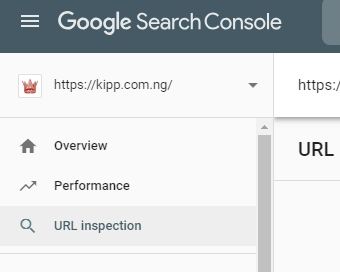
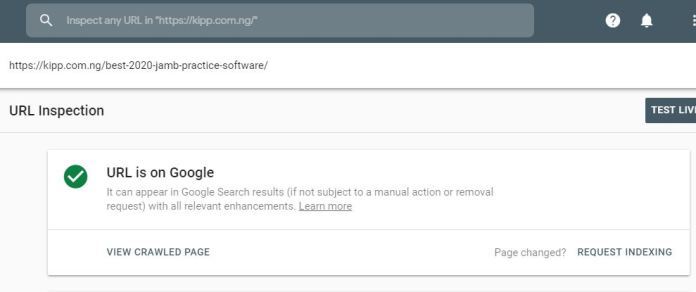
Google Search Engine tries to crawl or index every website on the internet through it crawler called – googlebot. Googlebot is simply computer program that tries to index your web content then save on google database so users can easily search on google and serves related web pages. This crawl process happens at time interval determined by google search engine system which may be several hours after you have created a post, or days or not at all. But, if you want your web page or post or url or content to be quickly crawled(within seconds, minutes) and indexed to google search engine, then this post will be your guide. This will especially be useful for website, blog owners or managers. Kindly see the image below. How to quickly appear on Google Search Engine for new Post 1. Open Google Search Console, https://search.google.com/search-console. If you are yet to create account before, the webpage will ask you to create account. After which you can start using the Google Search Console tool. 2. Click on URL inspection as seen in the picture above.how to quickly appear on google search engine for new post appear first on google search make google search engine quickly crawl my website 3 3. Copy your newly posted content URL e.g. for example “https://naijabestforum.com/174/how-to-quickly-get-google-adsense-approval-for-your-website†then put in the “Inspect any URL as seen in the above picture, then click enter or click on the search button. Google will search for some seconds then reveal the status of this URL, if it is already crawled and indexed or yet to be indexed. Like the above URL, it is already on Google(URL is on Google) as seen in the above image. If your URL is not on Google, click on REQUEST INDEXING at the Bottom Right corner as seen in the page above. Wait for some seconds, and your URL will be set to be crawled and indexed to Google Search Engine. READ: How to setup a Forum website like Nairaland This is a tested concept. If you have any questions, drop below in the comment section. Happy Blogging, Creating Contents, and appearing fast on Google Search.
2 Likes |
| ... |
Suggested: » Anthony Joshua Names 7 Fighters He Wants To Face Before Retirement « » How to Setup Affiliate website like NNU, WAKANDA, LPV FORUM and Make Money « » Anambra Intercepts Transport Company Conveying Passengers To Lagos (Photos) « » Keep crying while I enjoy your ex husband’s money’ – Tonto Dikeh’s ex bestie, mocks her « » Passenger Coughs, Dies At Checkpoint In Osun/oyo Boundary « |

Recommended for you
How To Make Money On Naijabest Forum - Updated On 27th April 2020 • How To Know If You Are In Love Or In Trouble • How To Post Properly On Naija Best Forum Nbf • How To Cure Ulcer Naturally •|
Sections: Jobs-Business-Investments, Religion, Health, News-Politics-Others, Romance, Phones and Tech Reviews, Science and Tech, Sport, Gaming, Fashion, Celebrity, Scholarships, Polytechnics, Travel, College of Education, University, Crypto, Ethereum, BNB, Solana, TON, & Others, Security, Programming, Webmasters, Privacy Policy | Terms & Conditions | Contact Us | About Us | Forum Rules | Sitemap Guud Forum - Copyright © 2019 - 2026. All rights reserved. See How To Advertise.Disclaimer: Every Guud Forum member is solely responsible for anything that he/she posts or uploads on Guud Forum. |